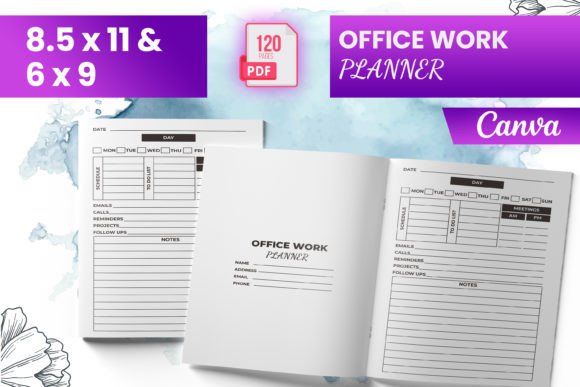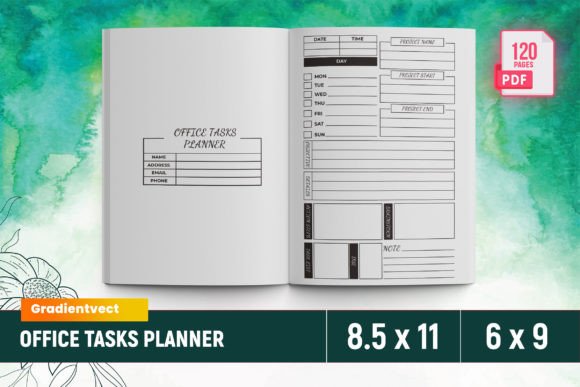
KDP Office Work Planner Canva
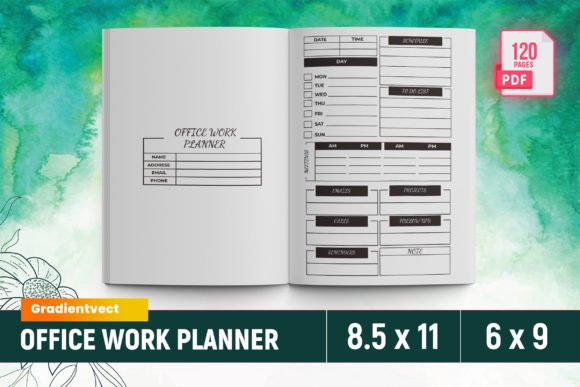
Whether you’re launching your first planner on Amazon KDP or refining a series for your freelance business, the KDP Office Work Planner Canva delivers a polished, production-ready interior—no design expertise required. It’s not just another template. It’s a tested, bleed-enabled, 120-page office planning system built specifically for Kindle Direct Publishing, with every page sized to 8.5 × 11 inches and formatted across 6–9 interior files for optimal upload performance.
What You Get — Straight from the File Folder
This isn’t a vague “design kit” with layers of guesswork. What’s included is precise and practical:
- One ready-to-upload PDF file — fully bleed-optimized and KDP-validated (no warnings, no rejections)
- 120 total pages, thoughtfully organized: intro, monthly spreads (January–December), daily & weekly layouts, meeting minutes, project plans, call logs, lead follow-up trackers, appointment schedules, deadlines lists, contact directories, order forms, and customer feedback pages
- PNG and JPG source files — useful if you want to tweak colors, fonts, or branding before finalizing your PDF
- All files pre-tested on Amazon KDP — meaning margins, resolution, color mode (CMYK), and bleed settings meet current KDP requirements
No need to wrestle with Canva’s export limitations or risk pixelation when scaling. The interior is built to print cleanly—whether readers use it digitally or order physical copies through KDP’s print-on-demand service.
Why This Matters — Differently for Different People
A planner isn’t one-size-fits-all. How someone uses—or evaluates—the KDP Office Work Planner Canva depends heavily on their role, goals, and comfort level with publishing tools.
For Beginners Just Getting Started on KDP
If this is your first time uploading an interior, reliability matters more than customization. You’ll appreciate that every page meets KDP’s specs out of the box. No trial-and-error uploads. No surprise margin warnings. The intro page helps orient buyers, and the consistent layout reduces cognitive load—for you while preparing the file, and for your readers using it. A beginner might skip editing the PNGs entirely and go straight to uploading the PDF. That simplicity saves hours—and avoids early discouragement.
For Freelancers & Service-Based Professionals
Freelancers managing multiple clients often juggle overlapping deadlines, meetings, and follow-ups. They don’t just need structure—they need flexibility *within* structure. The KDP Office Work Planner Canva includes dedicated sections like “Lead Follow-Up,” “Work Project Plan,” and “Meeting Minutes” that mirror real-world workflows. A graphic designer could rename “Work To-Do List” to “Client Revisions Tracker.” A copywriter might repurpose the “Order Form” as a content brief template. Because the source files are included, light edits stay fast and low-risk.
For Educators & Trainers
Teachers, corporate trainers, and workshop facilitators often build custom resources for students or teams. This planner works well as a teaching tool—not just for time management, but for modeling professional habits. The “Customer Feedback” and “Contact List” pages double as classroom activity templates: students can simulate client interactions or practice data organization. Since the interior is clean and uncluttered (no distracting graphics or over-designed elements), it leaves room for annotation and adaptation—ideal for both in-person instruction and digital learning platforms.
For Small Business Owners & Solopreneurs
When your calendar, inbox, and task list live in three different apps, consolidation has real value. The KDP Office Work Planner Canva bridges those gaps with integrated spreads: “Emails” next to “Appointments,” “Deadlines List” aligned with “Monthly View,” and “Calls List” linked to “Lead Follow-Up.” One local marketing consultant told us she prints two copies each month—one for her desk, one for her notebook bag—and uses the “Work Project Plan” spread to map quarterly campaigns alongside client deliverables. For her, long-term usefulness outweighs flashiness. She values clarity, consistency, and space to write—not decorative flourishes.
For Creators Building a Planner Brand
If you're developing a line of niche planners (e.g., for real estate agents, therapists, or remote developers), this interior serves as a strong, compliant foundation. You can swap headers, adjust color palettes using the included PNGs, or layer in your own icons—all while preserving KDP compatibility. One educator-entrepreneur used the base layout to create a “Teacher Leadership Planner,” adding school-year-specific milestones and staff meeting prompts. Because the original files were tested on KDP, she spent less time troubleshooting and more time iterating on audience-specific content.
What’s Not Included — And Why That’s Okay
This is strictly an interior template—not a full publishing package. There’s no cover design, no marketing copy, and no ISBN guidance. That’s intentional. It keeps the focus narrow: solving one problem well (a dependable, KDP-ready office planner interior) instead of stretching across too many use cases. If you already have a cover designer or use KDP’s built-in cover creator, this interior slots in cleanly. If you’re still learning how KDP handles trim sizes or bleed, the included files serve as reliable reference examples—something you can open, inspect, and learn from.
How to Know If This Fits Your Needs
Ask yourself:
- Do you need a functional, no-frills office planner interior that uploads without errors? → Yes? This matches.
- Are you comfortable making small tweaks in Canva or a basic image editor? → Yes? The PNG/JPG files give you room to personalize.
- Do you prioritize speed and predictability over maximal creative control? → Yes? The ready-to-upload PDF removes friction.
- Are you building for professionals who rely on structure—not inspiration? → Yes? The emphasis on schedules, lists, and documentation aligns.
It’s not ideal if you’re seeking highly illustrated, themed interiors (e.g., floral, minimalist, or animated styles) or if you need editable text layers in layered PSD format. But for grounded, practical planning—backed by KDP compliance—it delivers exactly what it promises.
A Tool That Grows With You
The best productivity tools don’t demand perfection upfront. They support progress—whether you’re sketching your first work plan on a printed page or scaling a planner brand across dozens of niches. The KDP Office Work Planner Canva works at both ends: as a launchpad for newcomers and as a reliable component for experienced creators. Its strength lies in its restraint—clean typography, logical flow, and thoughtful section variety—so your content, not the design, stays front and center.