KDP Brand Vision Planner Canva
Clarity doesn’t emerge from busyness—it emerges from intention. When you’re building a brand through Kindle Direct Publishing, every page matters—not just the ones readers see, but the ones that shape your thinking before a single word is written. The KDP Brand Vision Planner Canva is not another generic template. It’s a structured, bleed-ready interior framework designed for creators who treat branding as strategy, not decoration.
Why This Isn’t Just Another Planner
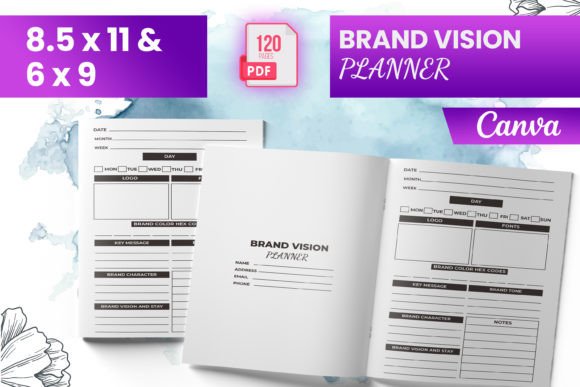
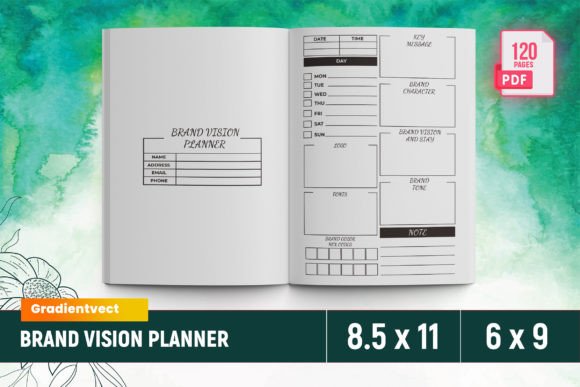
Most planners ask what you’ll do. The KDP Brand Vision Planner Canva asks why you’ll do it—and how that “why” translates into consistent voice, visual cohesion, and reader trust across titles, series, and platforms. It’s built around Amazon KDP’s technical requirements (8.5 × 11 inches, 120 pages, bleed-ready), but its real value lies in how it surfaces decisions most authors delay until after launch: core values, audience alignment, tone boundaries, and visual non-negotiables.
Unlike free Canva templates that prioritize aesthetics over function, this planner embeds publishing pragmatism into every section—starting with an intro page that forces specificity (“Who is this book *for*, not just *about*?”), moving through branded voice guidelines that prevent tonal whiplash between your thriller series and your newsletter, and ending with a branding kit checklist that ensures your cover, interior, and social assets speak the same language.
What You Actually Get—and Why Each Piece Matters
- READY TO UPLOAD PDF FILE: No reformatting. No guessing about margins or bleed lines. You open it, customize, and upload—reducing friction at the most vulnerable stage: final submission.
- 6–9 interior files (8.5 × 11 inches): Enough variation to match different genres or series structures without sacrificing consistency. A memoir may need deeper reflection prompts; a children’s activity book benefits from visual cue placement—this range supports both.
- 120 total pages: Not filler. Every page serves a decision point—e.g., “Belongs To” isn’t administrative. It’s where you define ownership of brand assets (fonts, color codes, image licenses) so collaborators or future team members don’t dilute your positioning.
- Intro page + Core Values + Brand Voice + Branding Kits: These aren’t abstract exercises. They’re operational anchors. Your core values determine which collaborations you accept. Your brand voice dictates whether a sentence like “Let’s dive in!” feels authentic—or alien—to your audience.
- Tested on Amazon KDP: Files render correctly on Kindle Previewer and pass KDP’s preflight checks. That means fewer rejection loops, less time troubleshooting DPI or CMYK mismatches, and more time refining content instead of correcting formatting.
- PNG + JPG files included: For marketers and designers who build ads, email headers, or social banners—these are production-ready assets, not placeholders.
When to Use the KDP Brand Vision Planner Canva—Strategically
Timing changes everything. Using the KDP Brand Vision Planner Canva post-launch is like installing seatbelts after the crash. It’s useful—but reactive. The highest leverage moments are:
- Before your first title goes live: Even if you’re writing fiction, your author brand begins with the first blurb, bio, and cover. This planner helps you decide whether “mysterious” means atmospheric suspense or witty misdirection—before readers form their first impression.
- When expanding into a new genre or sub-brand: Launching a romance pen name while maintaining your nonfiction authority? The planner forces separation: distinct voice rules, separate branding kits, and intentional crossover boundaries.
- Before hiring a designer or editor: Instead of saying “make it look professional,” you hand them documented brand voice examples, hex codes, and approved image styles. That reduces revision rounds and aligns expectations upfront.
- During annual brand review: Revisit your “Core Values” page every 12 months. Does “transparency” still mean sharing your research process—or does it now include disclosing affiliate links? Evolution is healthy—if it’s deliberate.
How to Use It Without Wasting Time
Don’t try to fill all 120 pages in one sitting. That’s not planning—it’s performance. Instead:
- Start with the “Belongs To” page. List who owns each asset: your cover designer? Your editor? You? If you license fonts or stock images, note license terms and expiration dates here. This prevents legal surprises later.
- Write your brand voice as a constraint, not a slogan. Instead of “friendly and approachable,” try: “Uses contractions but avoids slang; explains jargon once, then assumes familiarity; never uses ‘just’ or ‘simply’ when describing complex ideas.” Constraints guide decisions.
- Use the PNG/JPG files as touchpoints—not decorations. Drop your primary color swatch into Canva and test it against 3 common background options (white, light gray, cream). Does text remain legible? Does contrast meet WCAG 2.1 AA standards? That’s usability—not aesthetics.
- Print the “Core Values” page and keep it beside your desk. When you’re tempted to rush a launch to hit a trend, ask: “Which value does this serve—and which does it compromise?”
Risks of Using It Without Context
A tool sharpens intent—it doesn’t replace it. The KDP Brand Vision Planner Canva becomes counterproductive when used as a checklist rather than a compass. Common pitfalls include:
- Filling sections to “complete” the planner, not to clarify: Writing “authenticity” as a core value means nothing unless you define what inauthentic behavior looks like in your workflow (e.g., outsourcing blurbs without reviewing tone).
- Assuming consistency equals rigidity: Your brand voice can evolve—but only when the evolution is documented and aligned with audience feedback, not algorithm shifts or competitor moves.
- Ignoring bleed implications for content layout: Because this interior is bleed-ready, margin-sensitive elements (like sidebars or pull quotes) must be placed within safe zones. The planner includes visual guides—but skipping those leads to cut-off text or awkward white space.
Long-Term Value Beyond the First Upload
This isn’t a one-time document. It’s your brand’s operating system. Over time, it supports:
- Scalable collaboration: Share the “Branding Kit” section with freelancers so your next cover designer doesn’t reinvent your palette—and your next editor knows whether “casual” means Oxford commas or zero punctuation in dialogue tags.
- Efficient repurposing: Turn your “Core Values” page into a filter for guest post pitches. Decline opportunities that require compromising a stated value—even if the exposure seems large.
- Customer experience alignment: Your “Brand Voice” guidelines should echo in your KDP book description, your Amazon author central bio, and your reply to a 1-star review. Consistency builds recognition; recognition builds loyalty.
- Decision speed: When Amazon introduces a new feature (like interactive notebooks or enhanced typesetting), you won’t ask “Should I use it?” You’ll ask “Does this serve my stated voice, values, or audience needs?”—and decide faster.
Final Thought: Planning Is a Practice, Not a Product
The KDP Brand Vision Planner Canva works best when treated as a living document—not a finished artifact. Update it when your audience’s questions shift. Revise your voice guidelines when your expertise deepens. Add new branding kit assets when you develop a signature illustration style. What makes it valuable isn’t the 120 pages—it’s the discipline of returning to your foundational choices, again and again, and asking: “Is this still true? Is this still useful? Is this still mine?”
That kind of grounded, repeatable reflection—the kind that shapes not just what you publish, but how you show up in the market—is the quiet advantage no algorithm can replicate.