End of Life Planner Canva KDP: A Practical, Editable Template for Real-Life Planning
Life moves fast — and so do responsibilities. Whether you’re a freelance designer juggling client deadlines, a parent managing household logistics, or a small business owner tracking contracts and accounts, one thing rarely gets scheduled: planning for what comes next. The End of Life Planner Canva KDP isn’t about dwelling on endings. It’s about creating clarity *now*, so the people you care about aren’t left scrambling later.
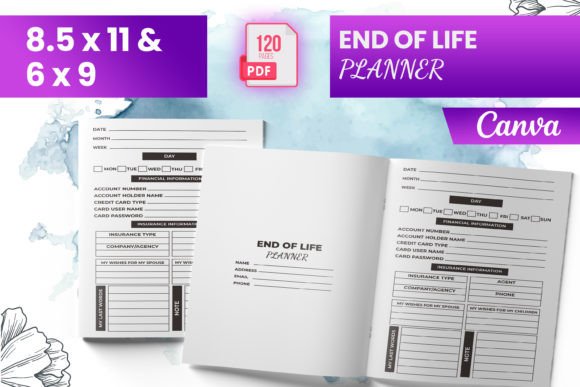
This isn’t a generic checklist or a static PDF you print once and forget. It’s a fully editable, bleed-ready interior template built in Canva — designed specifically for Amazon KDP publishing, but equally useful as a personal digital organizer. You get instant access to a polished, tested 120-page interior file that works *immediately* — no formatting guesswork, no last-minute KDP rejections over margins or bleed settings.
When and Where This Planner Fits Into Real Life
Think about the last time someone you knew passed away unexpectedly. Did their family know where the will was stored? Could they log into email or cloud storage without resetting passwords? Did anyone remember which utility account was tied to an old apartment lease? These aren’t hypotheticals — they’re daily friction points for grieving families.
The End of Life Planner Canva KDP helps prevent that. But it’s also used long before any crisis: by estate planners building client-facing resources, by educators teaching financial literacy, by content creators bundling digital products, and even by therapists guiding clients through advance care conversations. One freelance writer uses it as a companion tool when coaching midlife professionals on legacy-building — not just assets, but values, stories, and intentions.
Why Editable in Canva Makes All the Difference
You don’t need design software or KDP expertise to use this. Because it’s built in Canva, you can open it, personalize fonts, adjust colors, swap logos, add your own cover notes — all in minutes. No coding. No Illustrator learning curve. And since the files are pre-tested on Amazon KDP (including correct bleed, safe zones, and CMYK-ready PNG/JPG exports), you avoid the most common upload failures: cropped text, blurry images, or rejected interiors.
That means if you’re launching a side hustle selling printable planners, you can brand this as your own — insert your website, tweak section headers, add a “Designed by [Your Name]” footer — and upload straight to KDP. If you’re using it personally, you can delete pages you don’t need (like “Child Care Expenses”) or expand others (“Important Documents”) with your own sub-bullets.
Real Scenarios Where This Planner Delivers Tangible Value
- A small law firm includes a branded version as a free download for new estate planning clients — building trust while gathering structured info before the first consultation.
- An online educator bundles the editable Canva file with a video course on “Digital Legacy & Password Management,” giving students something actionable to apply right after each lesson.
- A caregiver supporting aging parents uses the “Document Location” and “Funeral Arrangements” sections to quietly gather details during visits — without making it feel like a heavy conversation.
- A solopreneur running a wellness brand adapts the “Meditation Tracker” and “Vision Board Notes” pages into a self-care add-on for their end-of-life coaching packages.
- A teacher leading a high school life skills unit prints select pages (like “Important Contacts” or “Letter of Gratitude”) as discussion prompts — helping students reflect on relationships and responsibility early.
What’s Actually Inside — And Why Each Piece Matters
The 120-page interior isn’t filler. Every section maps to a real administrative or emotional need:
- Bank Account, Credit Card, Retirement Account pages help consolidate login details *and* note joint holders, beneficiaries, or automatic payments — critical for avoiding frozen accounts or missed bills.
- “E-devices login + Intent Passwords” goes beyond usernames: it asks *what should happen* to each device — archive, wipe, transfer, or memorialize — so heirs act intentionally, not reactively.
- “My Belongings” and “Final Resting Arrangement” give space for specific wishes (e.g., “Donate my guitar to the local youth center,” “Cremation only — no service”) — reducing family conflict later.
- Trackers like “Bill Payment Tracker” and “Debt Payment Tracker” aren’t just for planning ahead — they’re often used *during* transitions, like when a spouse takes over finances after a partner’s diagnosis.
- “Letter of Gratitude” and “Note to My Beneficiaries” offer emotional scaffolding — because legal documents rarely capture tone, humor, or love.
Before You Download or Publish: What to Consider
This planner is powerful — but it works best when matched to your actual needs. Ask yourself:
- Are you publishing on KDP? Then the included 6″ x 9″, 8.5″ x 11″, and other trim sizes matter — and the bleed-ready setup saves hours of troubleshooting.
- Are you using it personally? You’ll want to scan the “Document Location” and “Insurance Details” sections first — those tend to be the highest-leverage starting points.
- Are you adapting it for clients or students? The Canva editability means you can simplify language, add translations, or embed QR codes linking to video explanations.
- Do you need legal validity? This is a planning tool — not a substitute for a will, power of attorney, or healthcare directive. Always recommend users consult qualified professionals for binding documents.
Also worth noting: the inclusion of both PNG and JPG exports gives flexibility. PNGs preserve transparency for logos or icons; JPGs keep file size lean for faster KDP uploads. And because every page was tested on KDP, you won’t waste time adjusting gutters or fixing resolution warnings.
Not Just for “Later” — It’s for Right Now
We don’t wait until retirement to start saving. We don’t wait until burnout to set boundaries. So why wait until illness or age forces the conversation about final wishes? The End of Life Planner Canva KDP meets people where they are — whether that’s a 28-year-old freelancer backing up passwords, a 45-year-old teacher preparing classroom materials, or a 62-year-old entrepreneur documenting business succession plans.
It doesn’t ask you to have everything figured out. It asks you to start with one page. One login. One letter. One note to someone you love. That’s how clarity begins — not in grand gestures, but in quiet, consistent, editable steps.