KDP Monthly Bill Tracker Canva
Managing bills doesn’t have to mean juggling sticky notes, forgotten email reminders, or last-minute panic when rent is due. The KDP Monthly Bill Tracker Canva is a thoughtfully designed, ready-to-publish interior template built specifically for creators and planners who want to turn financial tracking into something simple, visual, and genuinely usable — not just another spreadsheet gathering digital dust.
What It Actually Is (Beyond the Buzzwords)
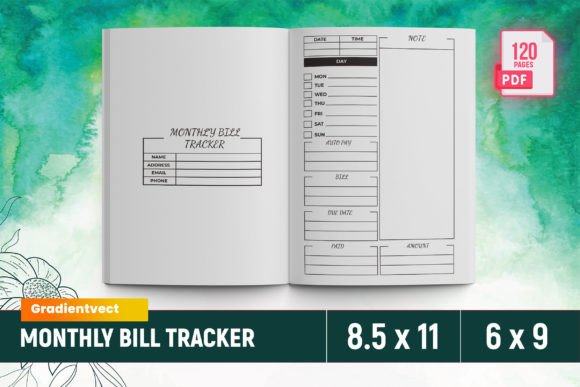
This isn’t a generic planner or a vague “budgeting tool.” It’s a 120-page, print-ready interior file optimized for Amazon Kindle Direct Publishing (KDP), created using Canva’s intuitive design framework — then professionally prepped so you don’t have to guess about bleed, margins, or KDP’s strict formatting rules. Every page works as part of a cohesive system: clean layouts, consistent spacing, smart typography, and intentional white space — all tested on real KDP uploads to avoid rejection or cropping surprises.
You get one polished PDF file — no assembly required — plus supporting PNG and JPG files if you ever want to tweak colors, add branding, or adapt pages for social previews or print-on-demand variants. It’s sized at standard 8.5" x 11", with bleed included, and structured across 6–9 sections that flow logically through the billing cycle: from setup and due-date mapping to payment logging, category review, and year-end reflection.
Where This Tracker Fits Into Real Life
Think of it like your quiet, reliable co-pilot for money management — especially when life throws curveballs. Here’s where people actually reach for it:
- New renters and roommates splitting utilities, internet, and groceries — the tracker helps visualize shared responsibility, avoids awkward “Who paid the water bill?” texts, and builds trust through transparency.
- Freelancers and solopreneurs whose income isn’t predictable — they use the monthly spread to align irregular paydays with fixed obligations (health insurance, software subscriptions, quarterly taxes) and spot cash-flow gaps before they become emergencies.
- Parents managing household logistics — between school fees, extracurriculars, car insurance renewals, and seasonal expenses like back-to-school supplies or holiday gifts — this tracker turns scattered deadlines into a calm, glanceable rhythm.
- Adult children supporting aging parents — coordinating medication refills, Medicare premiums, property tax installments, and home care invoices becomes less overwhelming when everything lives in one organized, physical (or printable) place.
- Students transitioning to independence — learning how to track rent, phone plans, student loan interest accrual, and even small recurring costs like streaming services builds early financial awareness without pressure or judgment.
Why “Ready to Upload” Matters More Than You Think
If you’ve ever uploaded an interior to KDP only to get flagged for “bleed issues,” “low-resolution images,” or “incorrect margins,” you know how frustrating rework can be. The KDP Monthly Bill Tracker Canva eliminates those hiccups by design. The bleed is baked in correctly. Fonts are embedded or converted to outlines. Page count (120) meets KDP’s minimum for paperback interiors without padding. Even the intro page follows KDP’s content guidelines — no copyright traps, no misleading claims, just clear, helpful framing.
That “ready to upload” promise means you’re not buying a concept — you’re buying time saved, confidence gained, and a product that performs as advertised. No need to hire a formatter. No late-night Canva tutorials trying to reverse-engineer KDP specs. Just download, verify your cover matches, and publish.
Who Benefits Most — And How They Use It Differently
A small business owner might print three copies: one for their office binder, one laminated and hung near the desk for quick updates, and one scanned and shared with their bookkeeper. A teacher might use the blank note pages to jot down scholarship application deadlines alongside tuition payments. A couple planning a wedding could repurpose the “upcoming due dates” section to track vendor deposits and venue balance payments — turning a finance tool into a project-management aid.
The flexibility comes from structure, not rigidity. Because it’s built in Canva (and includes source-compatible files), users who want to personalize it — adding their logo, swapping accent colors, or inserting custom icons — can do so easily. But crucially, the core functionality remains intact: clear date fields, checkboxes for paid status, columns for amount, method, and notes, plus summary spaces that encourage reflection, not just recording.
Things to Keep in Mind Before You Jump In
This tracker shines when used consistently — but consistency doesn’t mean perfection. If you miss a week? Flip to the next month and start fresh. It’s designed to forgive, not shame. That said, it’s not a replacement for automated tools like banking alerts or auto-pay. Think of it as the human layer on top: where you pause, notice patterns (“Huh — I always overspend on groceries in December”), and make intentional choices.
It also assumes basic comfort with printing or binding. While the PDF works perfectly for digital annotation (on tablets with stylus support), its full value emerges when printed — the tactile act of checking off a box, writing in a reminder, or flipping back to compare last month’s totals. If you’re fully committed to a paperless workflow, consider whether you’ll actually use it digitally — or if a dedicated app might serve you better.
And while the interior is KDP-optimized, remember: your cover design, pricing strategy, and marketing copy still determine visibility. This tracker gives you a high-quality, trustworthy interior — but your audience connects with clarity, empathy, and relevance in how you present it.
Strengths That Stand Out in Practice
First, it’s tested. Not “designed to spec” — but actually uploaded, previewed, and verified on KDP. That small detail saves hours of troubleshooting. Second, the 120-page count isn’t filler — it’s intentional pacing. Enough space to track 12 months deeply, include setup guides, reflection prompts, and seasonal checklists — without feeling bloated or repetitive. Third, the bleed-ready format means professional-looking edges when printed, no white borders cutting off important headers or dates.
Finally, it respects your time. No deciphering cryptic instructions. No hunting for hidden layers in Canva files. Everything you need — the final PDF, image assets, sizing confirmation — is delivered cleanly and clearly. That reliability builds trust, both with your customers (if you’re publishing) and with yourself (if you’re using it).
A Tool That Grows With You
Financial habits evolve. So does this tracker. Use it one way in your first year of freelancing, then adapt it later for family budgeting or retirement planning. The clean design leaves room for your own insights — marginal notes, highlighter marks, sticky tabs marking priority months. It doesn’t shout advice; it holds space for your experience.
Whether you’re building a KDP catalog, simplifying your own finances, or helping someone take their first confident step toward money awareness — the KDP Monthly Bill Tracker Canva meets you where you are. Not with complexity, but with calm, capable design — ready when you are.