Homework Tracker Canva KDP: A Practical Interior Option for Self-Publishing Educators and Planners
A Homework Tracker Canva KDP interior is a ready-to-upload, professionally formatted PDF designed specifically for Kindle Direct Publishing (KDP) — with bleed, correct margins, and print-ready specifications already applied. It’s not a standalone app or digital tool, nor is it a physical planner you order from a retailer. Instead, it’s a pre-designed, editable interior file built in Canva, optimized for KDP’s technical requirements, and intended for creators who want to publish their own homework tracking journal without starting from scratch.
What Makes This Homework Tracker Canva KDP Distinct?
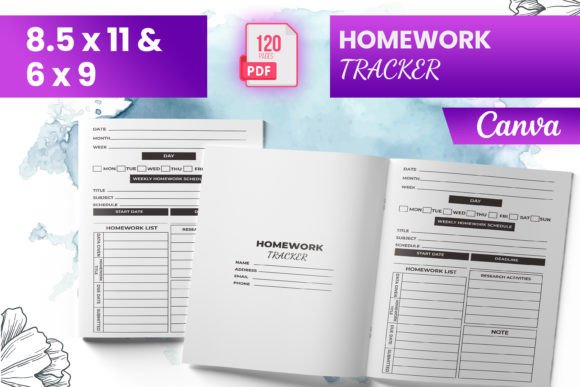
The defining feature of this Homework Tracker Canva KDP interior is its dual readiness: editable *and* production-ready. You receive 120 total pages — including an intro page — sized at standard US letter (8.5 × 11 inches), as well as 6 × 9 and other common trim sizes. All files include bleed, meaning no white edges appear after trimming during printing. The package also includes PNG and JPG exports, useful for preview thumbnails or marketing visuals — but the core deliverable is the PDF, tested on Amazon KDP to confirm compatibility with their upload system.
Unlike generic printable PDFs that require manual resizing or margin adjustments, this interior follows KDP’s exact guidelines: 0.125-inch bleed, appropriate gutter spacing for binding, CMYK-safe color profiles (where applicable), and embedded fonts. That reduces the risk of rejection during upload — a common pain point for first-time KDP users unfamiliar with print specs.
How It Compares With Other Homework Tracking Resources
When evaluating options for organizing student assignments, adults often consider several categories: digital tools (like Google Classroom or Notion templates), physical planners (pre-printed or refillable), downloadable PDFs (non-KDP-optimized), and self-published interiors like this Homework Tracker Canva KDP. Each serves different needs.
Digital tools offer real-time syncing, reminders, and collaboration — ideal for students managing multiple classes or teachers coordinating with parents. But they rely on consistent device access and internet connectivity. Physical planners provide tactile satisfaction and reduce screen time, yet lack flexibility: you can’t easily duplicate pages, adjust layouts per subject, or scale content across grade levels.
Generic downloadable PDFs — even those labeled “editable” — often assume use in Adobe Acrobat or similar software. Many aren’t structured for KDP’s two-page spread logic, bleed requirements, or spine width calculations. Users may spend hours troubleshooting margins or reformatting before achieving a clean print result.
In contrast, the Homework Tracker Canva KDP interior bridges flexibility and compliance. Because it’s built in Canva, users familiar with that platform can personalize colors, headers, icons, or section labels — then export directly into a KDP-accepted format. There’s no need to learn InDesign or wrestle with printer marks. Yet unlike fully automated digital trackers, it preserves the intentional pacing and reflective space of a printed journal — beneficial for learners developing executive function skills.
Strengths and Realistic Tradeoffs
One strength lies in scalability. With 120 pages across multiple sizes, the Homework Tracker Canva KDP interior supports semester-long planning — whether for middle school math, high school AP courses, or college-level research projects. The inclusion of an intro page allows customization of instructions, grading criteria, or motivational notes — something static print planners rarely accommodate.
Another advantage is ownership. Once purchased, you control the final product. You can brand it with your logo, add school-specific deadlines, or adapt terminology (“assignments” vs. “tasks” vs. “learning goals”) to match curriculum language. This matters for educators publishing supplemental resources or small educational businesses building a catalog.
However, there are tradeoffs. Since the template is Canva-based, full editing requires a Canva account — and while the free tier works for basic changes, some fonts, elements, or export options may require Canva Pro. Also, although the PDF is tested on KDP, minor adjustments might still be needed depending on your cover design, chosen paper type (cream vs. white), or whether you opt for expanded distribution.
It’s also worth noting: this is strictly an interior file. It does not include a cover, ISBN assignment, marketing copy, or KDP setup guidance. If you’re new to self-publishing, you’ll still need to navigate KDP’s interface — selecting trim size, setting pricing, writing a compelling description — though the interior itself removes one major technical hurdle.
Best-Fit Situations: When This Homework Tracker Canva KDP Shines
This interior works especially well when you need consistency across multiple students or classrooms — for example, a homeschool co-op leader preparing individualized binders, or a tutoring service offering branded planning tools. Because all pages follow the same layout logic (e.g., weekly spreads, subject tabs, reflection prompts), students develop predictable routines without cognitive overload from inconsistent formatting.
It’s also practical for educators who want to test demand before investing in custom design. Instead of commissioning a designer for $300–$800, you can launch a low-cost version using this Homework Tracker Canva KDP interior, gather feedback, and iterate — all within days rather than weeks.
For adult learners returning to education — perhaps balancing coursework with full-time jobs — the structure offers scaffolding without infantilizing. Pages aren’t oversimplified or cartoon-heavy; they support goal-setting, time estimation, and progress review in ways that align with adult learning theory.
When Another Option May Be More Appropriate
If your priority is interactivity — such as auto-calculating due dates, linking to online rubrics, or embedding video feedback — then a digital solution remains more suitable. Similarly, if you only need short-term tracking (e.g., a single 4-week summer course), a simple spreadsheet or printable weekly sheet may be faster and more adaptable than uploading and proofing a full 120-page KDP book.
And if branding, typography control, or advanced layout features (like layered templates or conditional formatting) are essential, professional design software like Affinity Publisher or Adobe InDesign offers deeper precision — albeit with a steeper learning curve and higher time investment.
Making an Informed Choice
Choosing a Homework Tracker Canva KDP interior isn’t about finding the “best” tracker overall — it’s about matching a resource to your specific context: your technical comfort level, publishing goals, audience expectations, and long-term maintenance needs.
Ask yourself: Do I need to distribute identical, print-ready materials at scale? Am I comfortable making light edits in Canva, or do I require pixel-perfect control? Is consistency across formats (e.g., matching cover + interior + digital companion) part of my strategy? How much time am I willing to invest in setup versus ongoing use?
There’s no universal answer. But for educators, tutors, and independent creators seeking a balance of customization, compliance, and speed — without sacrificing professionalism — the Homework Tracker Canva KDP interior provides a grounded, functional option worth evaluating alongside alternatives.